The industry's default tool for "automation" is a canvas full of nodes and arrows. Trigger, action, condition, action. It works for simple stuff: new lead in Salesforce, send a Slack message, add a row to a spreadsheet. Three nodes, done. Ship it.
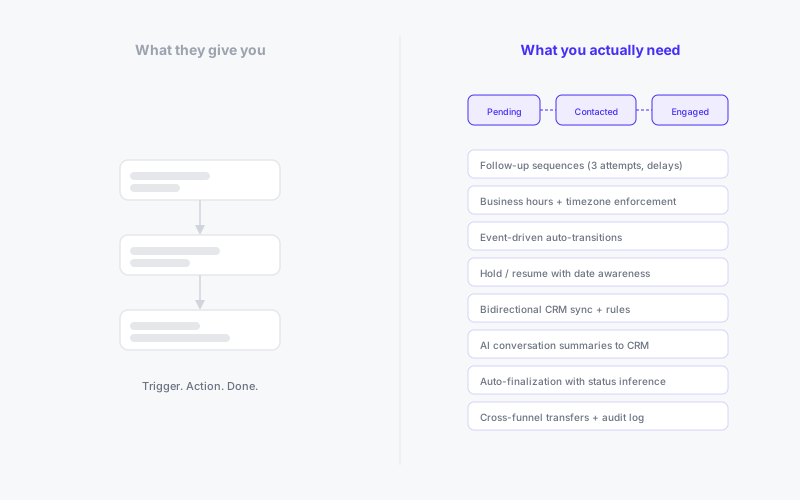
Now try this: a multi-stage outbound campaign where an AI agent initiates WhatsApp conversations with CRM-synced leads, follows up with AI-generated messages on a schedule that respects business hours and timezones, auto-advances contacts through stages based on conversation events, holds entries when the agent detects the contact is traveling, resumes them automatically on a specific date, syncs conversation summaries back to your CRM as notes, auto-finalizes inactive contacts after a configurable silence period, transfers engaged contacts to a different funnel for onboarding, and tracks every state change in an auditable event log.
Draw that in n8n. You can't. Not because n8n is bad at what it does. Because what it does isn't what this requires.
The Three-Node Illusion
Node-based automation tools were designed for event-driven integrations: when X happens, do Y. They're excellent at that. A webhook fires, a row gets created, an email gets sent. The workflow starts, runs, and ends in seconds. No memory, no state, no time-awareness needed.
But the moment your workflow needs to persist across days or weeks, the model breaks. Where is this contact in the journey right now? When was their last interaction? How many follow-ups have they received? Are they on hold? When should the hold expire? What stage were they in when the conversation ended, and what does that imply about their final status?
Node-based tools don't have answers to these questions because they weren't designed to ask them. An n8n workflow fires and forgets. It has no concept of "this contact is in stage 3 of a 5-stage journey and has received two follow-ups and is currently on hold until March 15th." To build that, you need state. And state is exactly what these tools don't have.
You can work around it. Store state in Google Sheets. Use a database. Build a webhook listener that queries the sheet, checks conditions, and triggers the next step. Congratulations: you've built a fragile, undocumented state machine out of spreadsheets and prayers. It will break at 3 AM on a Sunday and nobody will know why.
The other thing node-based tools can't handle well is time. Follow up in 48 hours, but only during business hours, and not on skip dates, and only if the contact hasn't replied in the meantime, and only if they're not on hold. Try expressing that as a node graph. You'll end up with a delay node, a conditional branch checking a timestamp in a spreadsheet, another branch checking a "replied" flag, another checking a "hold" flag, and a scheduled trigger that polls every hour to see if it's time yet. Each of these is a separate zap or a separate branch, and they all need to stay in sync.
This isn't automation. It's infrastructure cosplaying as automation.
What Multi-Stage Agentic Workflows Actually Look Like
Let's walk through what a real outbound engagement lifecycle looks like when it's designed properly. Not as a theoretical exercise, but as the actual sequence of events that a production system needs to handle.
Outreach
The journey starts with a CRM sync. New leads matching your filter criteria get pulled in automatically, on an interval. Their CRM fields get mapped to entry data: name, email, phone, plus custom metadata from associated objects. Duplicates are detected and skipped.
Each new entry enters the first stage: pending. Outreach fires automatically, but not immediately. The system checks the sending schedule: is it within business hours for this contact's timezone? Is today a skip date? If not, the entry waits for the next valid window.
When the window opens, the system resolves template variables from the entry's data, initiates a conversation on the configured channel (WhatsApp, email, or webchat), seeds the conversation state with everything the agent needs to know (contact info, funnel context, custom metadata), and fires the outreach message. The entry auto-transitions from "pending" to "contacted" on message_sent. The first follow-up is scheduled based on configured delay rules.
This is step one. In a node-based tool, this alone would be a multi-zap architecture with a CRM polling trigger, a deduplication check against a database, a scheduling delay with business hour logic, a channel-specific send action, a state update, and a follow-up scheduler. Six or seven zaps, minimum, and they all need to agree on where state lives.
Engagement
The contact replies. This triggers a cascade of events, all of which need to happen reliably and in the right order.
First, the pending follow-up gets canceled. You don't want the agent sending a "just checking in" message to someone who just replied. Second, the entry auto-transitions from "contacted" to "engaged" based on the reply_received event. Third, CRM rules fire: the CRM record gets updated with a "Contacted" status and the current timestamp. Fourth, conversation sync kicks in: an AI-generated summary of the conversation so far gets written to the CRM as a note (debounced to avoid flooding on rapid back-and-forth). Fifth, the agent continues the conversation with full funnel context available in its state.
Every one of these is a separate concern. In production, they all need to work. When one fails, the others should continue. The failure should be logged, flagged, and retryable without replaying the entire sequence.
Follow-up Sequences
The contact doesn't reply. The follow-up sequence begins.
Each attempt has its own configuration: delay after the previous attempt, content type (template-based or AI-generated), and template selection. The system respects the sending schedule on every attempt. On WhatsApp, if the 24-hour messaging window has closed, the system automatically falls back from freeform to template-based messages because that's what the platform requires.
Each attempt is tracked independently. If a follow-up fails to send, the attempt counter doesn't increment. The system retries on the next tick. If it succeeds, the counter increments and the next follow-up is scheduled. If the max attempts are exhausted and the contact still hasn't replied, the entry becomes eligible for auto-finalization.
Try building "three follow-ups with escalating delays, respecting business hours, with WhatsApp window detection and automatic template fallback, with independent failure tracking per attempt" in n8n. You'll need a delay node per attempt, a conditional check for the WhatsApp window, a fallback branch, a counter stored somewhere external, and a way to retry failed sends without replaying successful ones. And all of this needs to survive server restarts, because the delays span days.
Holds and Resumptions
During a conversation, the agent detects that the contact is unavailable. "I'm traveling until next Thursday." The agent calls a hold tool with a resume date. All processing pauses immediately: no follow-ups, no timeouts, no auto-finalization. The ticker skips this entry entirely.
On the resume date, the system automatically clears the hold and processing picks up exactly where it left off. The entry is back in its current stage, eligible for the next scheduled action.
The hold can also be indefinite, waiting for a manual resume. Or it can be initiated manually by an operator reviewing the funnel dashboard. Either way, the entire lifecycle is aware of the hold state. Nothing fires while the entry is held. Everything resumes cleanly when it's released.
This is a feature that sounds simple in description but is brutal to implement in event-driven automation. Every single piece of time-based logic (follow-ups, timeouts, auto-finalization) needs to check for hold status and respect it. In a node-based tool, that's a conditional check inserted into every branch of every workflow. Miss one and you're sending follow-ups to a contact who explicitly asked you to wait.
Auto-Finalization
A contact goes completely silent. Follow-ups are exhausted. No reply, no activity, nothing. After a configurable inactivity period, the system auto-finalizes the entry.
But here's the nuance: the final status depends on what happened during the journey. Did the contact ever reply? If yes, and then went silent, that's "abandoned" (they engaged but dropped off). Did the system contact them but never get a reply? That's "no_response." Were they never even successfully contacted? That's a different final status entirely.
The system infers the correct final status by examining the entry's history: which stages it reached, which auto-transition events fired. This is context-aware finalization, not a simple timeout. And it triggers the full transition cascade: CRM update, event logging, potential auto-transfer to another funnel.
Transfers
A contact completes the sales qualification funnel successfully. A transfer rule fires: entries with final status "success" auto-transfer to the onboarding funnel. The entry's state gets rebuilt for the new funnel context. Follow-up counters reset. Outreach fires in the new funnel. The contact's journey continues seamlessly in a completely different workflow with different stages, different rules, and potentially a different agent.
Transfers can also be manual. An operator reviews a contact and decides they belong in a different funnel. The transfer checks for duplicates in the target funnel (same CRM ID, same email, same phone), moves the entry, and fires outreach if the target funnel is configured for it.
Throughout all of this: every state change, every CRM push, every follow-up attempt, every error, every hold, every transfer is captured in an event log. The full history of how a contact moved through the system is auditable. Unresolved errors are flagged on the entry and visible in the dashboard.
The CRM Problem
Node-based tools treat CRM as a simple integration: read a field, write a field. But real CRM integration in agentic workflows is bidirectional, event-driven, and contextual.
Inbound sync isn't just "get new leads." It's polling with filters, field mapping (including composed fields like firstName + lastName), associated object resolution (pulling data from related records like opportunities or companies), deduplication by external ID, and immediate outreach triggering for new entries.
Outbound sync isn't just "update a field." It's rules that fire on specific events (stage transitions, messages sent, replies received, conversations ended) and push specific field updates with resolved system variables. When a contact reaches the "engaged" stage, set the CRM field "Last Contacted" to the current timestamp and "Status" to "Active." When the conversation ends with final status "success," write the conversation summary to a CRM note on the associated opportunity, not just the contact record.
Conversation sync is its own discipline: AI-generated summaries or full transcripts, written to CRM fields or created as notes, triggered on specific events, debounced to avoid flooding. The summary is generated by the same LLM that powers the agent, using the full conversation history, producing a concise third-person summary with key points, current status, and next steps.
In a node-based tool, each of these is a separate workflow. Inbound sync is one zap. Each outbound rule is another. Conversation sync is another. They all need to reference the same state, handle the same errors, and stay in sync with each other. At scale, you're maintaining dozens of interconnected workflows that were never designed to work together.
Why This Is a Platform Problem
The fundamental issue isn't that node-based tools are bad. They're good at what they were built for: simple, stateless, event-driven integrations. The issue is that agentic engagement workflows aren't simple, stateless, or purely event-driven. They're stateful, time-aware, multi-stage, multi-channel orchestrations that run for days or weeks per contact and need to handle dozens of edge cases reliably.
What these workflows need is a purpose-built platform:
- An embedded state machine with time-awareness that tracks where every contact is, when they got there, and what should happen next, while respecting business hours, timezones, and holds
- Event-driven transitions where conversation events (message sent, reply received, conversation ended) automatically advance entries through stages and trigger downstream actions
- AI-native follow-ups that can be template-based or agent-generated, with channel-specific compliance (WhatsApp window detection, template fallback)
- Bidirectional CRM sync with rule-based outbound updates, associated object support, and conversation sync with AI summarization
- Hold and resume mechanics that pause all processing and resume cleanly, whether triggered by the agent, the operator, or a timer
- Transfer orchestration that moves contacts between funnels with state rebuilding, deduplication, and automatic outreach in the target
- A complete audit trail logging every operation, surfacing errors, and providing full lifecycle visibility
- Testing infrastructure that lets you simulate the entire lifecycle without touching production data
You can approximate any one of these with enough zaps, webhooks, and Google Sheets. You cannot approximate all of them working together reliably. And "reliably" is the key word. These systems talk to real customers. A missed follow-up is a missed opportunity. A follow-up sent during a hold is a trust violation. A CRM update that fails silently means your sales team is working with stale data. The cost of unreliability isn't a failed workflow notification. It's lost revenue and damaged relationships.
The Opportunity
Designing these workflows is precisely the kind of work that businesses won't do themselves. They don't want to think about follow-up sequencing with WhatsApp window compliance, or CRM field mapping with associated object resolution, or auto-finalization logic that infers final status from engagement depth.
But someone has to. And that someone needs to understand both the business process (what should happen at each stage, what constitutes success, when to follow up, when to give up) and the platform mechanics (how stages, transitions, rules, and events interact).
This is the evolution of the automation consultant. Not "I'll set up your n8n flows" but "I'll design and operate your agentic engagement infrastructure." The workflows are more complex. The stakes are higher. The tools are more powerful. And the businesses that need this expertise are multiplying fast.
The consultants still reaching for node-based tools are bringing a hammer to a job that requires an engine. The ones who learn the engine first will own this market.