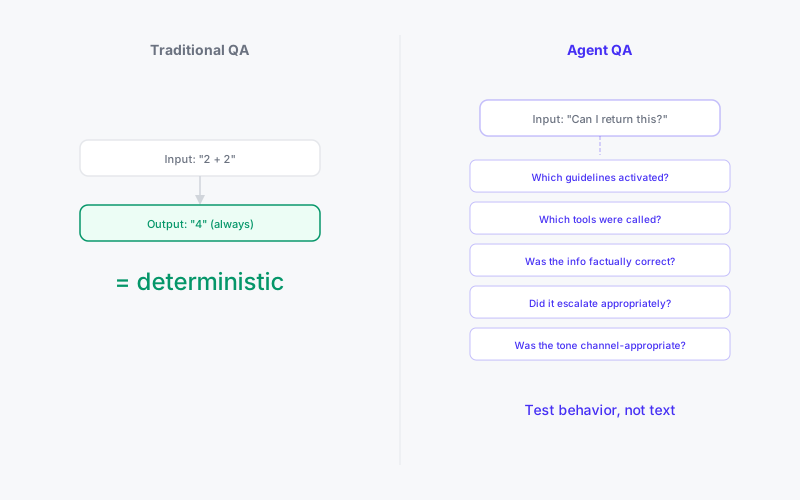
In traditional software, testing is straightforward. Give the function an input, check the output. If it matches the expected result, the test passes. If it doesn't, something is broken. The same input always produces the same output. That's the entire foundation of QA.
AI agents violate this assumption at every level. Ask the same question twice and you might get two different phrasings. Change one guideline and three unrelated behaviors shift. The agent's response depends on the conversation history, the customer's profile, the current state of the knowledge base, which guidelines matched, which tools were called, and which composition mode was used to generate the response. The output is never identical. It's only hopefully equivalent.
This breaks the mental model most teams bring to testing, and it's why most agent deployments don't test at all. They prompt-tune until the demo looks good and hope for the best.
That approach works until it doesn't. And when it doesn't, it fails in production, in front of real customers, with real consequences.
What You're Actually Testing
The first mistake is trying to test the agent's exact words. You'll never get a deterministic text match from a language model, and you shouldn't try. What you're testing is behavior, not text.
Behavioral assertions look different from traditional assertions. Instead of "the response equals X," you're asserting:
- Did the agent provide the correct information (factual accuracy)?
- Did it use the right tool for this scenario?
- Did it escalate when it should have?
- Did it stay within its behavioral constraints (no unauthorized promises, no off-topic responses)?
- Did the right guidelines activate for this conversation context?
- Did the journey advance to the correct stage?
- Was the tone appropriate for the channel and situation?
These are all testable. They're just not testable with string comparison. They require structured evaluation of the agent's decision chain, not just its output text.
The Three Layers of Agent Testing
Layer 1: Guideline Resolution Testing
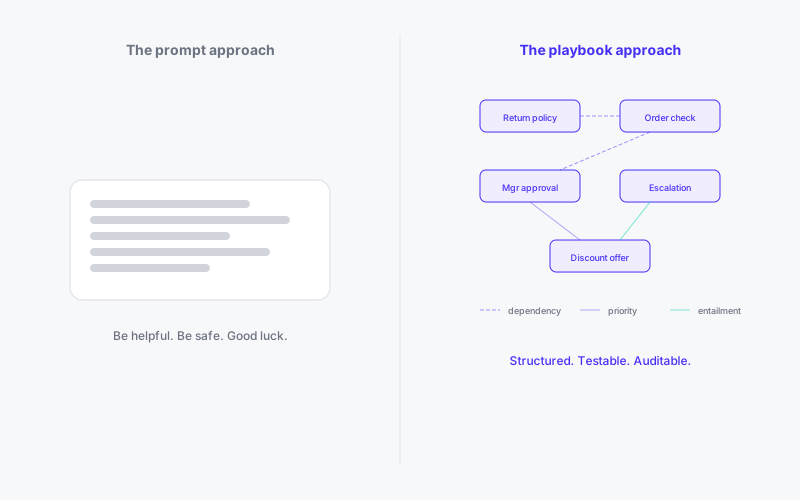
Before you test what the agent says, test what it decides. Given a specific conversation context, which guidelines activated? Which relationships resolved? Which tools became available?
This layer is actually deterministic. The same set of guidelines, relationships, and conversation context will always produce the same resolution result. The matching is LLM-based (so there's some variance), but the resolution logic (dependencies, priorities, entailment) is pure graph traversal. If guideline A depends on guideline B, and B didn't match, A will never activate. That's testable and repeatable.
Test cases at this layer look like: "Given a customer asking about returns with an order over $100, assert that the return-policy guideline AND the manager-approval guideline both activate, and that the manager-approval guideline has priority over the standard-refund guideline."
This is where you catch the most insidious bugs: guideline conflicts, missing dependencies, priority inversions, and entailment chains that activate rules you didn't intend. These bugs are invisible in the final output because the agent still produces a fluent response. It just produces the wrong fluent response.
Layer 2: Scenario Testing
A scenario is a complete conversation sequence: initial customer message, expected agent behavior at each turn, and final outcome assertions. This is the closest analog to integration testing in traditional software.
A good scenario includes:
- Setup: Customer profile, conversation channel, any pre-existing state
- Steps: A sequence of customer messages, each with behavioral expectations
- Assertions: Not "the agent said X" but "the agent provided the return policy, offered to initiate a return, and called the order-lookup tool"
- Outcome: Was the issue resolved? Was the right final action taken? Was escalation triggered when appropriate?
Scenarios should cover: happy paths (the common cases your agent handles daily), edge cases (the weird situations that break most agents), failure paths (what happens when a tool call fails, knowledge base returns nothing, or the customer goes off-topic), and escalation paths (situations where the agent should hand off to a human).
The key insight is that scenarios test the entire pipeline: guideline matching, relationship resolution, tool execution, knowledge retrieval, and response generation. A scenario failure tells you something is wrong. Diagnosing where requires drilling into the layers below.
Layer 3: Regression Testing
Every change to the agent's behavioral configuration can break something unrelated. Add a new guideline and it might conflict with three existing ones through an entailment chain you didn't consider. Update the knowledge base and a previously correct answer becomes wrong because the retrieval ranking shifted. Change a tool's availability scope and a journey that depended on it breaks.
Regression testing means running your full test suite after every change, before release. This is the safety net that lets you iterate confidently instead of making changes and hoping for the best.
The workflow is: make changes in preview mode (the live editing environment), run the test suite against the preview configuration, review any failures, fix them, re-run until the suite passes, then release the new version. If something slips through to production, revert to the previous released version while you diagnose.
Without this workflow, every optimization is a gamble. You might fix one issue and introduce three others. The only way to move fast without breaking things is to have comprehensive test coverage and run it religiously.
Building Test Suites That Scale
Most teams start with five test scenarios and declare coverage adequate. Then they launch, find 50 conversation patterns they didn't test, and spend the next month firefighting.
Start with your conversation analytics. What are the top 20 conversation topics by volume? Build scenarios for each. Then add the top 10 escalation reasons. Then the top 10 negative-sentiment conversations. You now have 40 scenarios that cover the vast majority of real-world interactions.
Add edge cases as you find them. Every production issue should become a test case. A customer asked a question that stumped the agent? That's a scenario. The agent called the wrong tool? That's a scenario. An escalation fired too late? That's a scenario. Over time, your test suite becomes a living document of everything that has ever gone wrong and a guarantee it won't go wrong the same way again.
AI can help here. Use language models to generate test scenarios based on your guideline descriptions and conversation history. They're good at imagining edge cases humans don't think of: "what if the customer asks about returns in Spanish when the agent only supports English?" "what if the customer provides a valid order number that belongs to a different customer?" "what if the customer asks two questions in one message, one the agent can handle and one it can't?"
The Release Discipline
Testing without release discipline is theater. If anyone can push changes to production without running the suite, the suite is worthless.
The correct workflow:
- Edit in preview. All changes happen in the live editing environment. Preview mode lets you modify guidelines, relationships, knowledge, and tools without affecting the production agent.
- Run the suite. Execute all test scenarios against the preview configuration. Review failures. Not just pass/fail but the details: which guideline misfired, which tool call was wrong, which assertion failed and why.
- Fix and re-run. Address failures, re-run the suite. Repeat until clean.
- Release. Snapshot the preview configuration as a new released version. This becomes the production behavioral graph. The previous version is preserved for rollback.
- Monitor. Watch production metrics for the first 24-48 hours. Is resolution rate stable? Escalation rate? Sentiment? If anything degrades, you have the previous version to roll back to immediately.
This cycle (edit, test, release, monitor) is the operational rhythm of every well-run agent deployment. It's not exciting. It's not "set it and forget it." It's the disciplined work that separates agents that get better over time from agents that degrade with every well-intentioned change.
What "Good Coverage" Looks Like
You'll never have 100% coverage of a non-deterministic system. But you can have coverage that makes you confident enough to deploy changes without fear.
Good coverage means: every high-volume conversation type has at least one scenario. Every behavioral guideline with criticality "high" is exercised by at least one test. Every tool integration is tested for both success and failure cases. Every escalation path is verified. Every journey has scenarios that traverse its main paths and its common exit points.
The metric that matters isn't "number of test cases." It's "percentage of production issues that were caught by the suite before release." Track this. If an issue reaches production that your suite should have caught, add the scenario and investigate why it was missing.
Over time, the suite becomes more valuable than the behavioral design itself. The design tells you what the agent should do. The suite proves that it actually does it. The consultants who deliver both are the ones whose clients sleep well at night.